At Clinica Sierra Vista, we’re committed to making your billing experience simple, secure, and flexible, just like your care. Whether you’re paying online, by phone, or through the mail, we’ve got you covered.
Start Here: Choose Your Date of Service
If your visit was ON or AFTER June 2, 2025
Pay through our new MyChart, our secure online portal for managing bills.
If your visit was BEFORE June 2, 2025
Use our legacy billing system for services received before our system upgrade.
Notice for MyChart Users Before June 2, 2025
If you had a MyChart account before our June 2 system upgrade, please note:
- You can still use your current username and password. A few users have been given new usernames; please check your email if this applies to you. ➜ Click here to learn more.
- Proxy access must be re-added if you manage care for someone else.
- To use billing tools, you’ll need to re-enter your payment info.
- We sent updates via email or text based on your contact details.
Pay Online with MyChart
We’ve made it easier than ever to view, understand, and pay your bill online. With MyChart, you can:
- Pay in full or set up a payment plan that fits your budget.
- View recent statements and payment history.
- Set up Auto Pay for convenience.
- Get reminders and notifications.
What You’ll Need
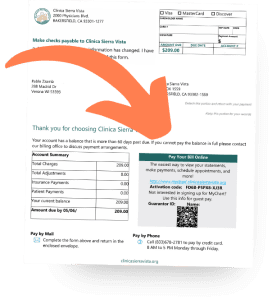
- A copy of your statement (look for your Account Number in the upper right corner)
- Your MyChart username and password
You can sign up for MyChart by scanning the QR code located on your bill.
MyChart SMS text messaging is now available for bill pay
Receive estimates and statements, pay your bills, or schedule a payment plan — from your texts! Opt in by texting START to 37358 or requesting text messages when checking in at your next appointment.
You may opt out at any time by texting STOP to 37358. Depending on your mobile phone plan, message and data rates may apply.
Messages are only sent to you if you have met the following criteria:
- You have a mobile phone number on file and have given appropriate consent through MyChart
- You’ve selected the appropriate options in the Communication Preferences activity in MyChart from the Billing Summary page, and selected the paperless billing alert.
Get a Price Estimate for Medical Care
To help you plan for upcoming care, such as a procedure, you can get an estimate from MyChart. The estimate is based on your insurance and what other patients have been charged in the past.
- Go to Billing > Estimates and select Create a New Estimate.
- Select where you want to have the procedure done and look up the kind of service you want to receive. You can search for the service or look through services by category.
- After you select the service and see the estimate, you can select Save so that you can refer to it later.
Other Ways to Pay
By Phone
Call us at (833) 678-2781
We are available Monday–Friday, 8:00 a.m. to 5:00 p.m.
By Mail
Send a check to:
Clinica Sierra Vista
Attn: Billing Department
P.O. Box 21810
Bakersfield, CA 93390
Sign Up for Paperless Billing
From the Billing Summary page, select the paperless billing alert.
If you want to receive an email or text message when a new paperless statement is available online, enter and verify your email address or mobile phone number and select the corresponding checkbox to receive notifications.
Select the I understand that I will no longer receive statements in the mail checkbox and click Sign Me Up.
Health Coverage Support and Financial Assistance
We are committed to helping every patient get the care they need, regardless of their ability to pay.
Clinica Sierra Vista helps patients and families apply for health insurance and financial assistance programs, including Medi-Cal, Covered California, and our Sliding Fee Scale. We can also connect you with other support programs, including WIC, CalFresh, CalWORKs/General Relief, the Breast and Cervical Cancer Treatment Program, Health Care Options, Medicare assistance referrals, and more.
Need Help?
Our billing team is here for you. If you need help accessing MyChart, setting up your account, or understanding your bill, call us at (833) 678-2781. We’re available Monday through Friday, 8 a.m. to 5 p.m.
Discover What’s New in Your MyChart Experience!
Whether you’re managing appointments, viewing lab results, or messaging your care team, our new MyChart is your trusted companion for staying informed and connected.